
OSOU Admission Confirmation Letter – Status Check and Email Delivery
Part of OSOU Admission: OSOU Admission 2026-27 Last Date, Application Steps and Portal Links
OSOU sends admission confirmation letters by email to candidates after verifying uploaded documents following the admission closing date. Learners enrolled in UG and PG programmes for the August 2026 session can check their application status by logging into the OSOU online admission portal using their registered email ID and password.
Fast facts
- University Name
- Odisha State Open University (OSOU)
- Delivery Mode
- Registered Email
- Dispatch Timeline
- After document verification and last date of admission
- August 2026 Session Last Date
- 7th October 2026
- Admission Support Email
- admission@osou.ac.in
- Online Admission Portal
- onlineadmission.osou.ac.in
On this page
- OSOU Alerts & Notifications
- OSOU Admission Confirmation Letter: August 2026 Session Notice – Email Dispatch Process
- OSOU Admission Confirmation Letter – Overview and Verification Process
- OSOU Admission Status Check: Important Highlights – Session Dates and Portals
- OSOU Online Admission Portal – Steps to Check Application Status
- OSOU Admission Confirmation Required Details – Mandatory Identifiers and Documents
- OSOU Admission Email and Login Issues – Troubleshooting Desk
- OSOU Programme Cancellation and Refund – Rules for August 2026 Session
- OSOU Student Action Step – Next Admission Deadlines
- OSOU pages you will need
- Official pages and documents for OSOU Admission Confirmation Letter
- OSOU Admission Confirmation Letter: common questions
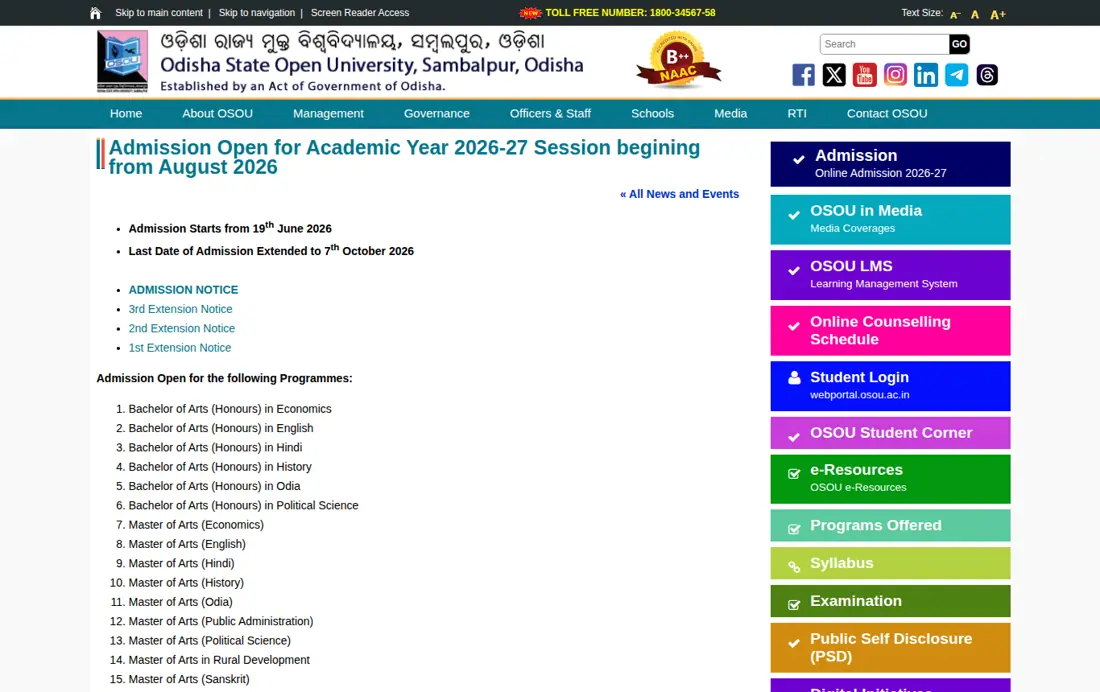
Odisha State Open University, also known as OSOU Sambalpur, issues admission confirmation letters to newly enrolled distance learners via registered email. For the August 2026 admission session of the 2026–27 academic year, online applications closed on 7th October 2026. Candidates who completed registration on the official online admission portal receive their official confirmation letters after document verification and admission closure.
OSOU Admission Confirmation Letter: August 2026 Session Notice – Email Dispatch Process
OSOU sends individual admission confirmation letters to candidates through email after verifying submitted certificates. For the August 2026 session, applications were accepted through the extended deadline of 7th October 2026.
Verification takes place after the final submission deadline for each academic cycle. Learners who submitted complete qualification certificates receive official confirmation once the admission committee approves their profile.
OSOU Admission Confirmation Letter – Overview and Verification Process
The OSOU admission confirmation letter serves as formal proof of enrollment for distance education learners across Odisha. Candidates pursuing undergraduate Honours degrees or postgraduate master programmes receive this document after verifying eligibility criteria.
Document verification requires applicants to submit clear scanned copies of qualification certificates and identity proofs. Applicants must ensure their registered email address remains active to receive official correspondence from OSOU.
OSOU Admission Status Check: Important Highlights – Session Dates and Portals
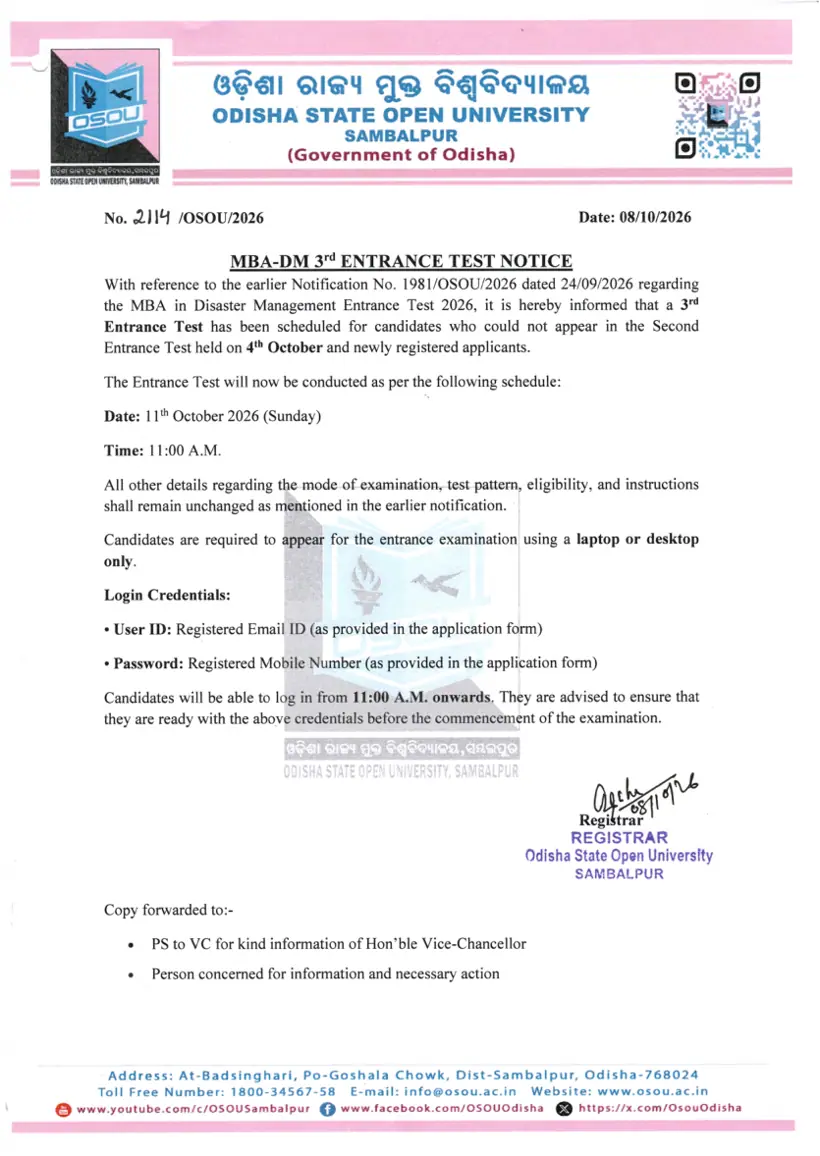
Tracking OSOU admission confirmation requires understanding key session deadlines and official portal credentials. The table below outlines essential admission operational details for distance education learners.
OSOU Admission Confirmation Key Facts
| Feature | Details |
|---|---|
| Confirmation Delivery | Sent via registered email |
| Verification Requirement | Verification of uploaded documents |
| August 2026 Session Deadline | 7th October 2026 |
| January 2026 Session Deadline | 06th March 2026 |
| Admission Portal URL | https://onlineadmission.osou.ac.in/ |
| Helpdesk Contact | admission@osou.ac.in |

OSOU: related tasks
OSOU Online Admission Portal – Steps to Check Application Status
Candidates can check their OSOU admission application status directly on the university’s online admission portal. Following the five-step application workflow allows learners to verify form submission and print confirmed copies.
- Open the OSOU online admission portal in a Web browser.
- Click on the ‘LOGIN’ button on the main navigation menu.
- Enter your registered Email ID and Password to sign into your candidate portal.
- Click on ‘Proceed to Apply’ to review the five-step application form summary.
- Verify your payment and document verification status, then select ‘Print Application Form’ for reference.
OSOU Admission Confirmation Required Details – Mandatory Identifiers and Documents
Filling out the OSOU application form requires specific academic identification numbers and digital copies of credentials. Applicants must prepare these mandatory items before submitting forms for verification.
- APAAR / ABC ID (Academic Bank of Credits) and DEB ID generated via UGC DEB portal
- Recent passport photograph in JPG format (500×600 px, maximum 200KB)
- Signature scan in JPG format (400×80 px, maximum 200KB)
- Name scanned in Odia script in JPG format (400×80 px, maximum 200KB)
- Educational qualification certificates in JPG or PDF format (maximum 300KB)
- Category certificate for SC, ST, or OBC Non-Creamy candidates, if applicable (maximum 300KB)
- Person with Disability (PwD) certificate in JPG or PDF format, if applicable (maximum 300KB)
OSOU Admission Email and Login Issues – Troubleshooting Desk
Learners encountering login errors or missing confirmation emails should contact the university admission helpdesk. Technical issues regarding deduction failures or profile corrections follow strict email protocols.
- Portal Login Errors: Send an email to admission@osou.ac.in stating your Enrollment Number along with a screenshot of the error.
- Payment Deducted but Not Reflecting: Wait for 48 working hours before reporting. If unresolved, email admission@osou.ac.in with payment proof.
- Profile Details Update: Send an email request to admission@osou.ac.in from your registered email address to correct name, phone number, or email details.
OSOU Programme Cancellation and Refund – Rules for August 2026 Session
Candidates seeking to cancel OSOU admission must submit a formal request prior to the announced session closing date. For the August 2026 session, cancellation requests had to be processed before 7th October 2026.
Refunds are processed within one month from the admission closing date once cancelled. Programme changes are not allowed after form submission, requiring learners to register afresh and cancel the previous application.
OSOU Student Action Step – Next Admission Deadlines
Enrolled candidates awaiting admission confirmation letters should check their registered email inbox and login to the portal regularly. Applicants needing support should email admission@osou.ac.in with their enrollment details.
OSOU pages you will need
| What you can do | Official page |
|---|---|
| Access OSOU online admission login portal | onlineadmission.osou.ac.in ↗ |
| Read OSOU August 2026 admission extension notice | osou.ac.in ↗ |
| Access OSOU student login portal | webportal.osou.ac.in ↗ |
OSOU Admission Confirmation Letter: common questions
What is the last date for OSOU admission for 2026-27?
The last date for OSOU admission for the August 2026 session of the 2026–27 academic year was 7th October 2026 after extensions. Admissions opened on 19th June 2026. Candidates fill out their application on onlineadmission.osou.ac.in by clicking NEW REGISTRATION and completing the five-step process.
What is the last date for OSOU PG admission for 2026?
For the August 2026 session, the extended last date for OSOU PG admission was 7th October 2026, while the January 2026 session deadline was 06th March 2026. Applicants register online at onlineadmission.osou.ac.in by selecting PROCEED TO APPLY. They must submit their forms and required qualification certificates before these cutoff dates.
How do students log in to the OSOU portal?
Students log in to the OSOU online admission portal by entering their registered email ID and password at onlineadmission.osou.ac.in. Learners must visit the main portal address, click LOGIN on the top menu, and input their credentials. This access allows candidates to check their form status or review payment verification.
How to get admission for PG programs at OSOU?
To get admission for PG programs like Master of Arts or Master of Commerce at OSOU, applicants must register on the online admission portal. Candidates complete a 5-step form covering personal details, academic history, document upload, and online fee payment. Creating ABC ID and DEB ID is mandatory prior to submission.
How are OSOU admission confirmation letters delivered to students?
OSOU sends admission confirmation letters directly via registered email to enrolled candidates after verifying uploaded educational documents. Delivery occurs after the session admission cutoff, such as 7th October 2026. Learners can also track form status at onlineadmission.osou.ac.in by clicking LOGIN and selecting Print Application Form once verified.
What should a student do if money is deducted but the application form is not updated?
If fee payment is deducted but does not reflect in the OSOU application form, the candidate must wait for 48 working hours. This applies to online payments submitted during the five-step process on onlineadmission.osou.ac.in. Candidates should log in after 48 hours to check if the payment status has updated.
How can a candidate apply for cancellation of OSOU admission and get a refund?
Candidates can cancel their admission before the last date of admission by sending an email request to admission@osou.ac.in. Applicants must provide their enrollment number and a clear reason for cancellation from their registered email ID. Approved refunds are processed and credited within one month from the last date of admission.
Are ABC ID and DEB ID mandatory for taking admission at OSOU?
Yes, creating an Academic Bank of Credit (ABC/APAAR) ID and a DEB ID is mandatory for admission at OSOU. Applicants must generate both IDs at deb.ugc.ac.in/StudentDEBId prior to applying. These credentials are then entered during step one of the application form at onlineadmission.osou.ac.in.
What are the document format and size requirements for uploading photos and signatures on the OSOU portal?
Passport photographs and signatures must be uploaded in JPG format with a maximum file size of 200KB each. Photographs must measure 500 by 600 pixels, while signatures must be 400 by 80 pixels. These files are uploaded during Step 3 of the application on onlineadmission.osou.ac.in.
Can a student change their chosen programme after submitting the OSOU admission form?
No, a programme cannot be changed once the OSOU admission application form is submitted online. To change programmes, candidates must complete a NEW REGISTRATION at onlineadmission.osou.ac.in before the cutoff date. Additionally, they must email an admission cancellation request from their registered email ID to admission@osou.ac.in.
What is the fee structure for the OSOU MBA in Disaster Management programme?
The total fee for the OSOU MBA in Disaster Management is Rs. 30,000, plus a Rs. 500 registration fee. Candidates can pay in two equal instalments of Rs. 15,000 each. The first instalment with the registration fee is submitted at onlineadmission.osou.ac.in during admission, while the second instalment is due before examinations begin.
More on Admission
- OSOU PG Admission Process 2026-27: How to Apply Online
- OSOU Admission 2026 – Courses, Eligibility, Portal Steps and Fees
- OSOU Admission 2026-27 Last Date, Application Steps and Portal Links
- OSOU Helpline Number and Head Office Contact Details – Sambalpur Address
- OSOU Re-Registration 2026: Second and Third Year Form and Fee
- OSOU Eligibility Criteria 2026 – UG and PG Requirements and B.Ed Status
Official pages and documents for OSOU Admission Confirmation Letter
- OSOU Admission Frequently Asked Questions and Guidelines PDF — OSOU admission guidelines and frequently asked questions PDF document