
OSOU Assignment Status 2026 – LMS Portal Closure and Submission Guidelines
Part of OSOU Assignments: OSOU Assignment – Front Page Format, Weightage and Submission Rules
OSOU assignment status and submission deadlines are managed online through the official LMS portal and webportal for distance learners across undergraduate and postgraduate programmes. For the July 2025 and February 2026 admission sessions, assignment responses carry 25% weightage toward final term-end evaluation.
Fast facts
- Official Assignment Portal
- OSOU LMS (lms.osou.ac.in)
- Result & Status Portal
- webportal.osou.ac.in
- Assignment Weightage
- 25% of total course evaluation
- Minimum Pass Marks
- 40% (or P Grade)
- Late Fine Structure
- Rs. 100 (standard), Rs. 500 (special)
- Mandatory Requirements
- LMS upload & hard copy submission
- LMS Support WhatsApp
- +91-98840 77034
On this page
- OSOU assignment status: August 2026 notifications – LMS late fine schedules and portal closure
- OSOU assignment status – tracking results, grade cards and certificates
- OSOU assignment status: key highlights – evaluation rules, weightage and pass marks
- How to upload OSOU assignments on the LMS portal?
- OSOU assignment submission details – cover page format and preparation rules
- OSOU assignment technical issues – LMS portal support and troubleshooting
- OSOU admission 2026 and fee details – disaster management MBA application dates
- OSOU assignment status next steps – action plan for learners
- OSOU pages you will need
- Official pages and documents for OSOU Assignment Status
- OSOU Assignment Status: common questions
Odisha State Open University, also known as OSOU Sambalpur, conducts continuous evaluation through compulsory course assignments for all registered distance learners. Students enrolled in undergraduate and postgraduate sessions, including July 2025 and February 2026 batches, must submit both online responses through the LMS portal and physical copies to study centres. Continuous assessment accounts for 25% of the total course marks, while term-end examinations account for 75%. Students can track assignment marks, exam results, and provisional certificates online through webportal.osou.ac.in.
OSOU assignment status: August 2026 notifications – LMS late fine schedules and portal closure
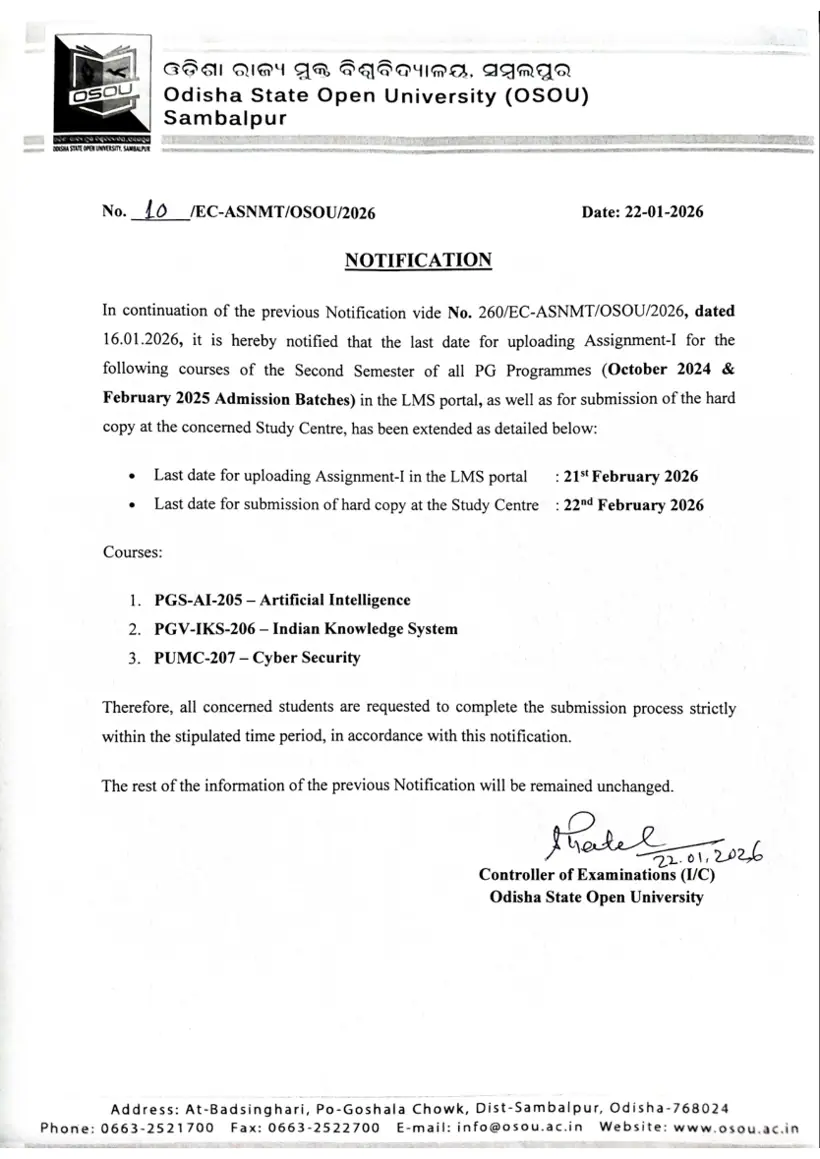
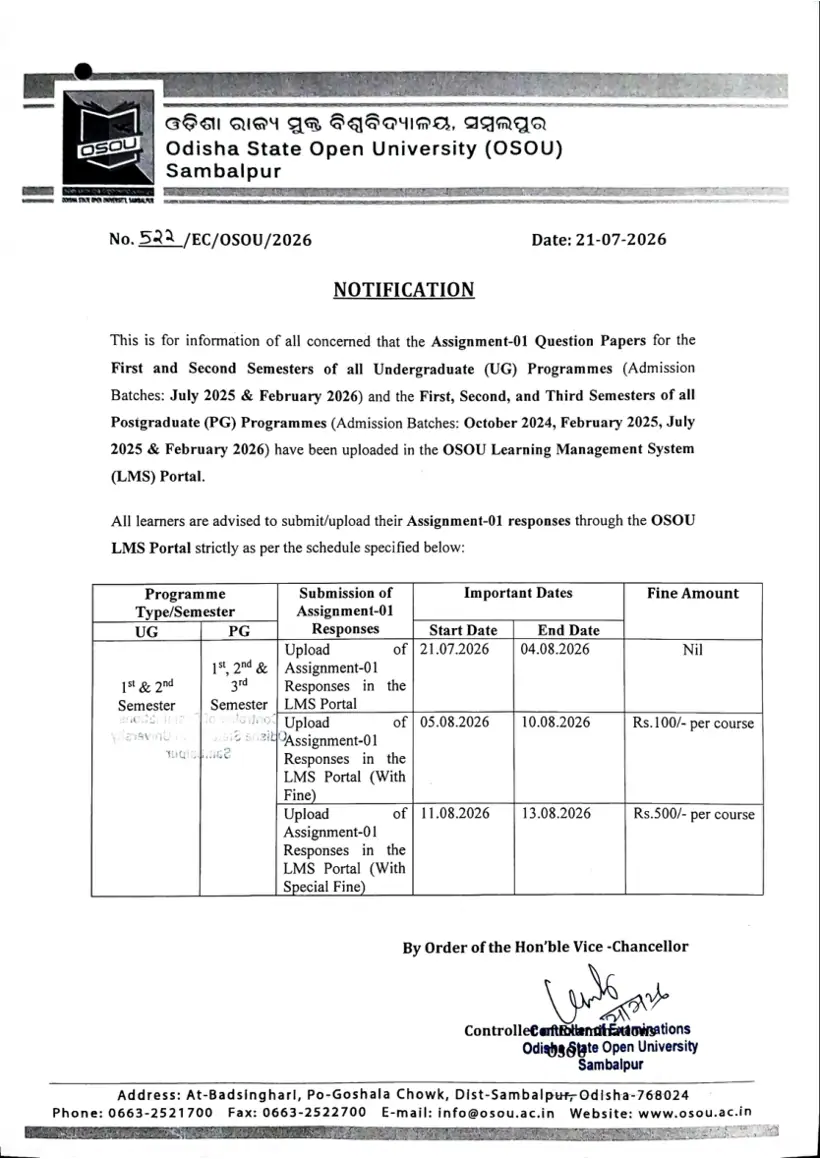
OSOU published Notification No. 560/EC/OSOU/2026 extending Assignment-01 submission up to 10 August 2026 without fine for July 2025 and February 2026 batches. Subsequent Notification No. 590/EC/OSOU/2026 temporarily suspended late-fine uploads due to technical issues.
The extended schedule applied to UG first and second semesters as well as PG first, second, and third semesters. Learners must monitor official notices for the revised late-fine portal reopening schedule.
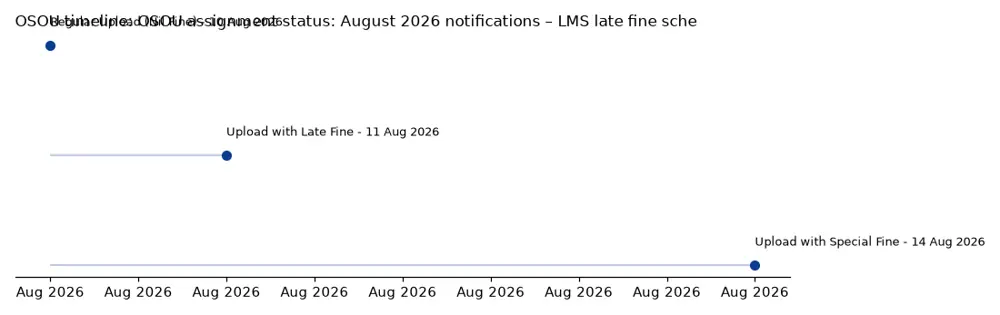
OSOU Assignment-01 Extended Submission Schedule (August 2026)
| Submission Stage | Applicable Dates | Fine Amount per Course |
|---|---|---|
| Regular Upload (Nil Fine) | Up to 10 August 2026 | Nil |
| Upload with Late Fine | 11 August 2026 to 13 August 2026 | Rs. 100/- |
| Upload with Special Fine | 14 August 2026 to 16 August 2026 | Rs. 500/- |
OSOU assignment status – tracking results, grade cards and certificates
OSOU learners can view their assignment marks, term-end examination results, and overall grade cards online through webportal.osou.ac.in ↗. The student webportal also provides access to provisional certificates, ULC, and migration certificates.
To access evaluation records, candidates navigate to the learners section on the webportal using their enrollment details. The platform updates assignment marks after evaluators at designated study centres evaluate submitted responses.
- Results of Term End Examinations and Assignments
- Grade Cards and Provisional Certificate
- ULC and Migration Certificate
- Re-Checking / Re-Evaluation of Answer Scripts
- Digital Identity Card download
OSOU assignment status: key highlights – evaluation rules, weightage and pass marks
OSOU assigns a 25% weightage to assignments in the overall course assessment, while the final term-end examination carries 75% weightage. Each theoretical assignment carries 100 full marks.
Learners must secure at least 40% marks or a P grade in each assignment to clear the course. For courses with practical components, theory assignments carry 15% weightage and practical assignments carry 10% weightage.
OSOU Assignment Evaluation & Passing Standards
| Evaluation Component | Course Weightage | Minimum Passing Criteria |
|---|---|---|
| Theory Assignment (Non-Practical Course) | 25% | 40% Marks (P Grade) |
| Theory Assignment (Practical Course) | 15% | 40% Marks |
| Practical Assignment | 10% | 40% Marks |
| Term-End Examination | 75% | As per university norm |
OSOU: related tasks
How to upload OSOU assignments on the LMS portal?
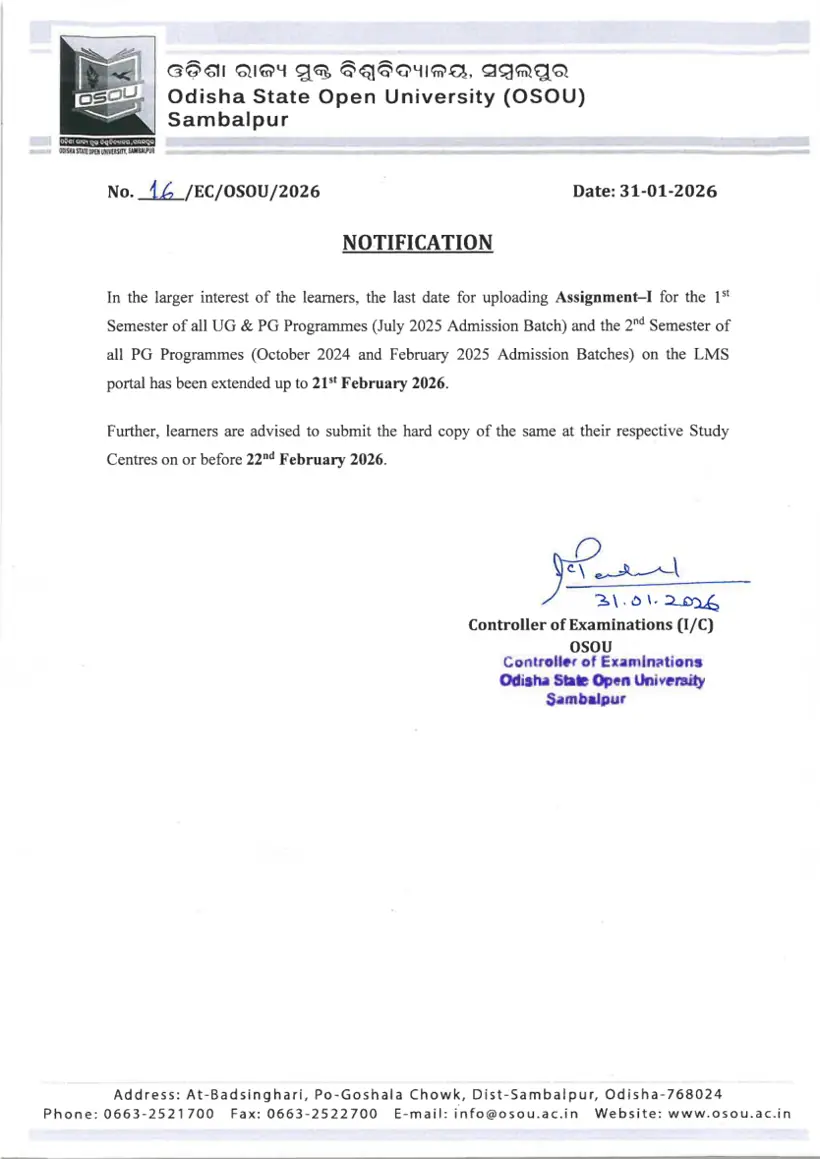
OSOU requires learners to submit their assignment answers online through the official OSOU LMS Portal before delivering physical copies to study centres. Failure to upload responses on the portal results in an automatic zero mark.
Candidates must write their answers by hand, scan the document, and log into their LMS portal account to upload the digital files. Follow these steps to complete the online submission:
- Open the official OSOU LMS Portal at lms.osou.ac.in.
- Enter your registered Enrollment Number or Email Id along with your Password on the login page.
- Click the Login button to access your student dashboard.
- Navigate to your assigned course and click on the specific Assignment submission link.
- Upload your scanned handwritten assignment PDF file and confirm the submission.
- Submit the handwritten hard copy of your assignment at your designated Study Centre on or before the study centre deadline.

OSOU assignment submission details – cover page format and preparation rules
OSOU guidelines mandate that every assignment response sheet must include clear identification details on the top cover page. Candidates must write answers in their own handwriting and maintain sufficient margins on the left side.
The evaluator at the study centre reviews the handwritten copy and provides comments in the left margin. Prepare your assignment booklet by including the required cover page fields:
- PROGRAMME TITLE
- ENROLMENT NO
- NAME
- COURSE CODE
- COURSE TITLE
- ASSIGNMENT CODE
- STUDY CENTRE (Name and Code)
- DATE
- SIGNATURE
OSOU assignment technical issues – LMS portal support and troubleshooting
OSOU provides dedicated technical support for LMS login issues, email retrieval, and assignment portal errors. If the portal experiences temporary closure or upload failures, learners must contact support services.
Technical assistance is available through email and WhatsApp during official working hours. Learners facing issues can reach support using these designated communication details:
- LMS Technical Support Email: support@ulektz.com
- WhatsApp Support Line: +91-98840 77034 (10:00 AM to 5:00 PM on working days)
- OSOU Examination Enquiry Phone: 0663-2521700
- OSOU Headquarter Email: info@osou.ac.in
OSOU admission 2026 and fee details – disaster management MBA application dates
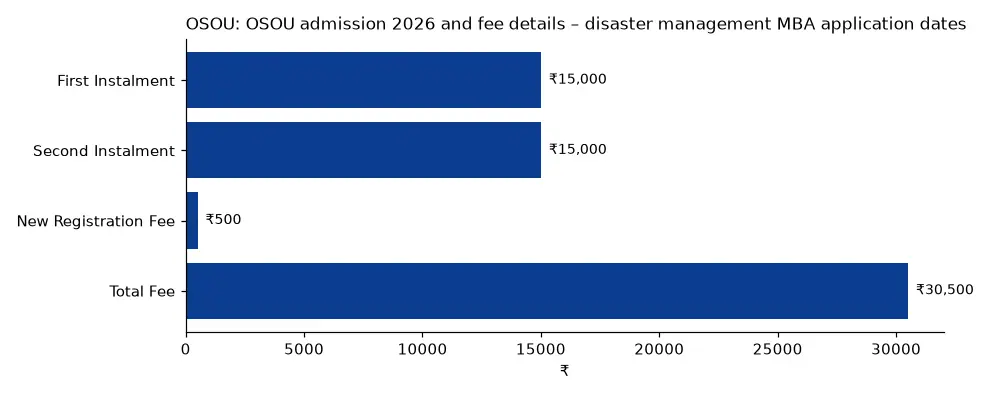
OSOU announced an extension for registration and application submission for the Master of Business Administration (MBA) in Disaster Management programme till 15 October 2025. The total fee of Rs. 30,500 includes an additional registration fee of Rs. 500.
The programme fee of Rs. 30,000 can be paid in two equal instalments of Rs. 15,000 each. OSOU has not published the last date to apply for fresh OSOU admission for the 2026-27 session on its site as of 23 November 2026.
OSOU MBA (Disaster Management) Fee Structure (October 2025)
| Fee Component | Amount | Payment Timeline |
|---|---|---|
| First Instalment | Rs. 15,000 | At the time of admission |
| Second Instalment | Rs. 15,000 | Before commencement of examinations |
| New Registration Fee | Rs. 500 | At the time of registration |
| Total Fee | Rs. 30,500 | Payable as two instalments plus registration fee |
OSOU assignment status next steps – action plan for learners
OSOU learners must log into OSOU LMS Portal immediately to check their active assignment status and download question papers for their session. Ensure both digital uploads and hard copy submissions at your study centre are completed promptly.
Regularly check OSOU Student Webportal to verify uploaded assignment marks and term-end examination results as soon as evaluators publish them.
OSOU pages you will need
| What you can do | Official page |
|---|---|
| Download active assignment question papers | osou.ac.in ↗ |
| Browse archived assignment question papers | osou.ac.in ↗ |
| Upload handwritten assignments online | lms.osou.ac.in ↗ |
| Check assignment results and grade cards | webportal.osou.ac.in ↗ |
| Contact university headquarters and regional centres | osou.ac.in ↗ |
OSOU Assignment Status: common questions
How do OSOU assignments work?
OSOU assignments are part of the continuous evaluation system carrying 25% weightage toward total course marks. Learners download assignment questions from osou.ac.in, write answers by hand, upload scanned copies to the LMS portal at lms.osou.ac.in, and submit physical copies at their Study Centre.
How to upload osou assignment?
To upload an OSOU assignment, log into lms.osou.ac.in with your enrollment number and password. Navigate to your enrolled course, select the assignment submission link, upload your scanned handwritten PDF file, and submit the hard copy to your study centre coordinator.
How to check osou result?
Students can check OSOU assignment and term-end examination results on webportal.osou.ac.in. Log into the learners portal using your credentials to view course-wise assignment marks, grade cards, and provisional certificates released by the examination division.
How to get an original certificate from Osou?
Learners can request grade cards, provisional certificates, ULC, and migration certificates through webportal.osou.ac.in. After completing all course assignments and term-end examinations with passing marks, students log into the portal to submit applications for official academic certificates.
What are the minimum pass marks for OSOU assignments?
Learners must secure a minimum of 40% marks or a P grade in each OSOU assignment to pass. If a learner fails or does not submit an assignment, they must re-submit the assignment response during the next academic year.
What happens if I do not upload my assignment on the OSOU LMS portal?
If a candidate fails to upload their assignment response on the OSOU LMS portal at lms.osou.ac.in, their assignment mark will be awarded as zero. Online LMS submission is mandatory along with physical submission at the study centre.
What is the late fine for submitting OSOU assignments?
Under Notification No. 560/EC/OSOU/2026, OSOU charged a late fine of Rs. 100 per course for delayed assignment uploads, and a special fine of Rs. 500 per course for uploads during the extended final window.
More on Assignments
Official pages and documents for OSOU Assignment Status
- OSOU Temporary LMS Closure Notice for Assignment 01 Late Fine PDF — Notice regarding temporary closure of LMS assignment submission portal
- OSOU Assignment 02 Submission Notice UG and PG 2026 PDF — Notice regarding submission of Assignment-02 for UG and PG batches
- OSOU Assignment 01 Submission Last Date Extension Notice August 2026 PDF — Extension notice for Assignment-01 submission deadline and late fines
- OSOU First Semester Assignment 1 Submission Notice July 2025 Batch PDF — Notice on Assignment-1 submission for 1st Semester July 2025 batch
- OSOU Master Degree 1st Semester Assignment Submission Notice February 2025 PDF — Notice on submission of assignments for Master degree programmes